
Apple TV User Guide. Apple tv: what it is, how it works

Content
What is Apple TV
In short, Apple TV is a device designed to broadcast media content from the iTunes Store and other online services to the TV screen. Why do users buy this gadget? Apple TV will turn the most ordinary TV into a smart device. Additional functionality that will be available to the user immediately after connecting:
- access to a library of high-quality video content, which is stored on special resources;
- broadcasting multimedia content to the TV screen from smartphones, tablets, players, as well as other devices running Windows and Mac OS operating systems;
- access to an impressive repository of audio tracks, podcasts, images, video games.
The Apple TV set-top box works on the principle of streaming media content. The latest models of this type of device have a limited amount of internal memory. Therefore, content must be stored in the cloud or on removable media: flash drives, external hard drives.
You don't have to buy content to watch a movie or TV show. Users have access to the “Rent” function. Therefore, the amount will be charged from your balance exclusively for viewing. This is a good way to save money.
The gadget is equipped with a built-in adapter for wireless Internet connection. Therefore, after connecting the set-top box, the user will be able to connect the TV to a wireless home network, even if it did not initially support Wi-Fi. No additional wires, adapters or adapters are required to set up the connection.
Apple incorporates many useful technologies into its devices. For example, AirPlay, with which you can quickly set up the synchronization of the TV with a computer or laptop. The control will be carried out by the remote control, which is included in the basic set-top box. The remote control can also be used as a computer mouse.
Analyzing the features of Apple TV, performance cannot be ignored. UHD and Full HD content plays without any lag. Multi-channel audio will enhance your movie viewing experience. 8 GB flash memory acts as a buffer for streaming data. The devices in question are equipped with a powerful Apple A5 processor.
Connection process
Modern TV models are equipped with an HDMI interface, through which a set-top box is connected. The cord is not included in the basic set of Apple Teavee. There is an alternative way to connect equipment – a component cable.
Connect the set-top box with the power cable to the outlet, and then connect it to the TV with a component or HDMI cable. The initial sync setting is done with the remote control. Connect to your home Wi-Fi network to log into iCloud. If the profile has not been created previously, register a new account.
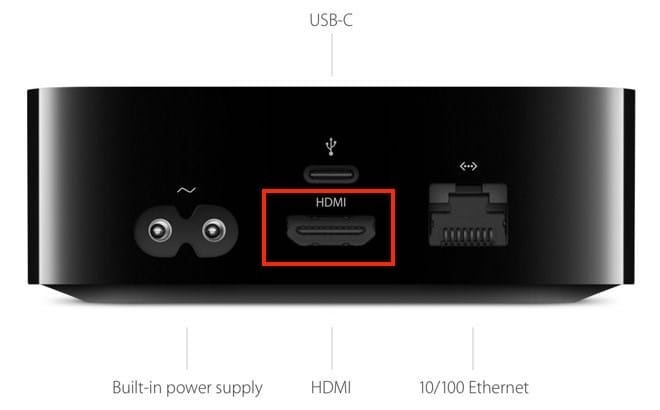
Subsequent configuration is carried out in the same way as in the case of other gadgets from Apple. To achieve the clearest possible sound when watching movies or listening to music, you can connect an audio system. The acoustics are connected with a fiber optic cable. Insert the plug into the interface marked “Toslink”.
All TV content in one app
The Apple TV app has everything you want to watch. This is the only place to find original movies and TV shows featured on Apple TV +. Here you will find all the best content, recommended by experts and curated especially for you. It's simple: the new Apple TV app is perfect for watching content.
Other new features
tvOS 13 brings exciting new experiences to Apple TV: full-screen video previews, a new Apple Arcade game service with cutting-edge original games, multiplayer support for all family members, and more.
Specifications
The filling of the devices is typical, but for this group of electronics it seems redundant:
| CPU | RAM | Memory | Ports | Price tr. | |
| Apple TV HD | Apple A8 / 2 cores / 1.1 GHz | 2 GB | 32/64 GB | USB-C/HDMI/LAN (10/100 Ethernet) | 10-12 |
| Apple TV 4K | Apple A10X Fusion / Quad Core / 2.37GHz | 3 GB | 32/64 GB | HDMI/LAN (Gigabit Ethernet) | 12-14 |
At the same time, the USB-C port in Apple TV HD is used only in service centers for engineering diagnostics. No user devices, such as an external drive or flash drive, cannot be connected to it.
Information: the cases of the 4th and 5th models differ in appearance only by the USB-C port, and the remote controls – by a white rim around the “Menu” button.
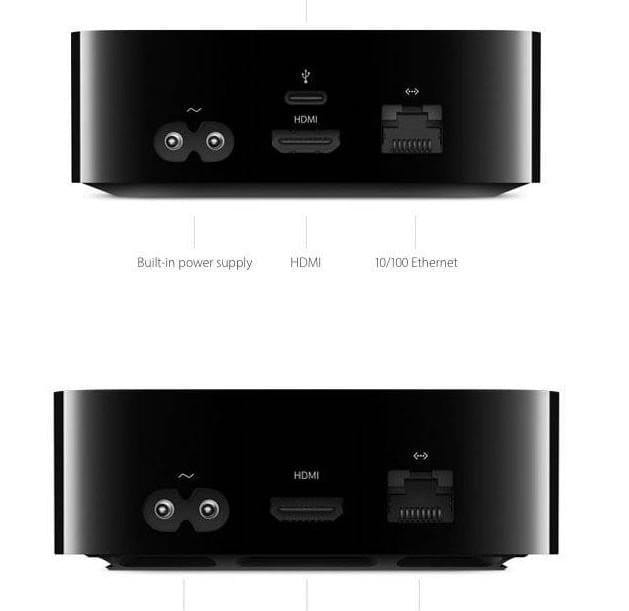
Both devices have Wi-Fi and Bluetooth modules. But in Apple TV 4K, the Bluetooth specification is 5th generation. The information transfer rate reaches 4 Mb / s. This allows for the simultaneous use of wireless accessories with minimal latency, which is advantageous in gaming mode.
Branded processors in the toughest operation mode, work without the slightest delay and freezes.
Apple TV HD only supports FullHD, while the 5th Gen Extender supports UHD 4K (2160p) video.
Apple TV software
Starting with the fourth generation, Apple media centers are controlled by the proprietary tvOS operating system, created on the iOS platform. The last release of version 10.1 came out this summer.
Since the tvOS operating system was written for a specific product, on the basic HomeKit platform, after connecting the set-top box, all Apple devices, without the participation of the owner, form a single information space. A wireless connection is established between all devices and when installing the recommended applications (Remote), the iPhone can be used as a joystick or remote control.
Info: HomeKit is an apple framework that has been integrated into tvOS. It is this platform that regulates the levels of pairing and interaction between all devices operating on this base. With the help of this development, through Apple TV, you can form and control the Smart Home system.
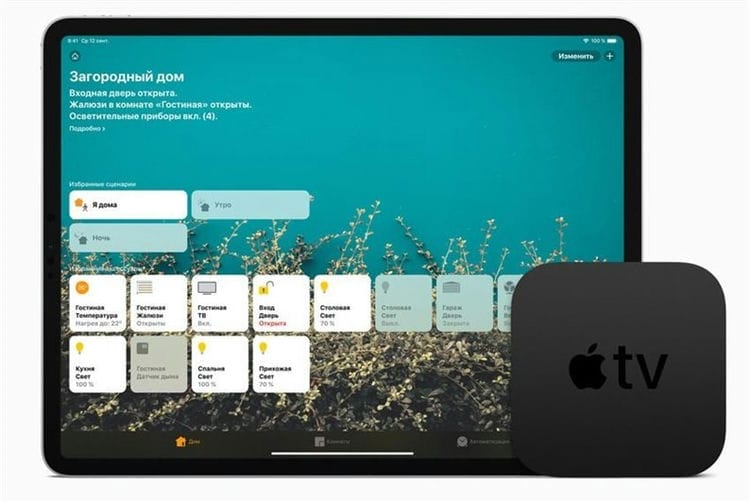
The control panel shell is as simple as possible, and is very reminiscent of the old FrontRow media player. There are no deep directories in the settings.
Additional programs are downloaded from the App Store.
It is impossible to give an exact figure, but the number of applications specialized for Apple TV in the App Store catalogs exceeds tens of thousands! Most of them are free, but you have to work hard to find the right utility. The reason for this is the lack of a dedicated directory “for Apple TV”.
Apple TV tasks
By the time the Apple multimedia consoles appeared, iTunes existed and successfully operated for 4 years. However, the distributed media content was not available for playback on television receivers. And they are in every home!
Considering the strategic decision of Apple analysts in light of the changes that have taken place, it is safe to assume that the Apple TV set-top box was designed specifically for the widest possible reach of users. Any owner of an apple gadget, being at home, could watch a favorite movie on the big screen, or join a network game. Fig 10
All in all, Apple TV is the home platform for connecting your modern TV to the limitless iTunes collection.
If you look at the sales statistics of the iTunes portal, you will notice a sharp increase in downloads after 07-08. Apple claims that after 2010, Apple TV users account for up to 20% of the volume of downloaded content. Of course, the size of one file affects this, for example, one musical composition “weighs” about 15 MB, and a film of HD quality is 1000 times more massive. But there are far fewer Apple TV consoles on hand than other Apple devices.
IMPORTANT: the set-top box is equipped with only one wired connection method – HDMI. It means that old TVs that do not have this port cannot be connected to Apple TV.
At a superficial glance, media players from other manufacturers do the same, and the amount of content in various online stores even surpasses iTunes. But here the factor of the apple universe intervenes.
One of the most powerful magnets that attracts consumers to Apple products is the highest quality. But in this combination, several conditions were combined at once:
- Productive hardware filling of the media center.
- High quality content.
- Complete software.
- Innovative technologies embedded in tvOS.
As a result, the user receives video of the highest quality, with elaboration of the smallest details, and this is surrounded by sound of the Dolby Atmos standard!
Dolby Atmos sound system was developed in 2012 for cinemas. It provides for the use of up to 128 channels of audio streaming, with software distribution and adjustment of the volume of each individual sound for a specific audio speaker.
To improve picture quality, HDR – Dynamic Range Expansion – is integrated into the Apple TV firmware.

The HDR function makes it possible to change the brightness of individual elements within the same picture. Dark areas become darker, light areas become lighter. The same applies to the color palette. As a result, the clarity of the image is increased so much that all characters that were previously blurred become readable on the screen.
All this splendor, Apple TV can broadcast to the local network for reception by third-party devices.
And it is especially important that the media center can play files of absolutely all current formats. Regular software updates are responsible for this.
If you are tired of complex SMART-TV remotes
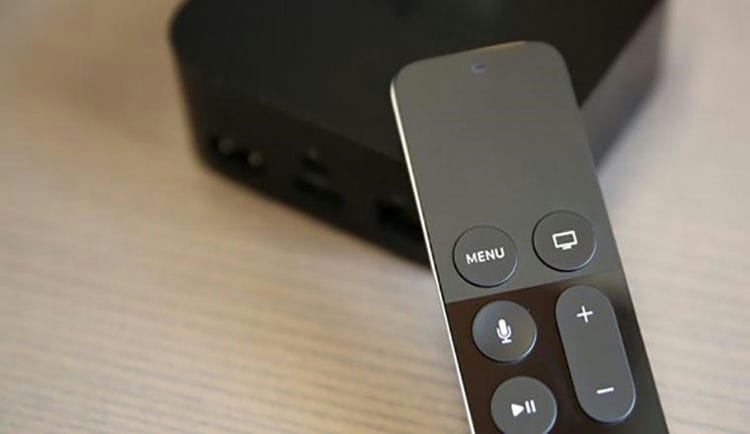
No matter how hard the Japanese and Korean engineers try, they fail to make an equally convenient remote for SMART-TV, which is in the box with the Apple TV.
A convenient touch panel with a matte surface allows you to control the set-top box with simple swipes familiar from iOS devices. The minimum number of buttons complete the picture.
In addition, the remote has an accelerometer and gyroscope, which will diversify the gameplay.
The remote itself is charged via the Lightning cable (included), no more purchases of batteries. One battery charge will work for several months.
If you consume licensed content

Are you a longtime supporter of iTunes, have a large database of purchased movies and music? Apple TV pulls up all previously purchased media content without any problems. You can also easily and conveniently rent movies and TV series. No torrents or pirates, everything is transparent and convenient.
It's time to get used to paying for the content you consume. Russia has long been on the way to a civilized media market.
If you are a music lover for life
The set-top box of the Cupertino company allows you to conveniently listen to music through a proprietary application. Apple's streaming service with cool playlists, new albums, and fun on-board selections.
Plus, you can easily connect wireless acoustics to the set-top box via Bluetooth. Convenient and logical solution.
For those who like to sing themselves, you can download the corresponding applications with the karaoke function. What Russian doesn't like to sing after or during a noisy feast?
If you want to show off your photos or videos
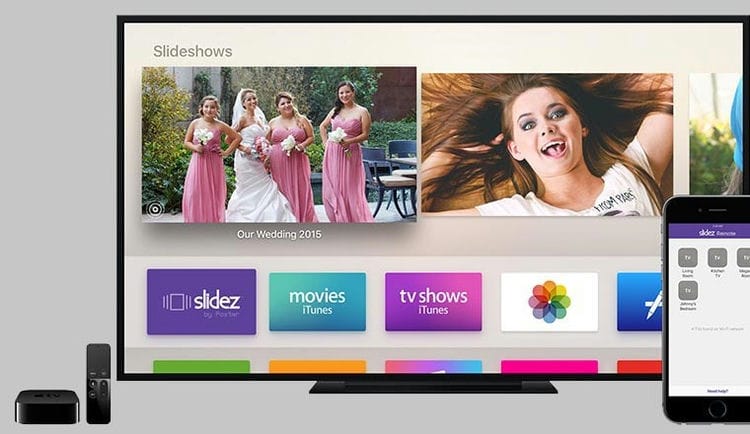
The built-in Apple TV Photo Gallery app lets you access albums from iCloud. It is one thing to show guests the screenshots taken from the iPad (even the Pro version), quite another on a 55-inch TV. In all colors and details.
You can create a slideshow or screensaver from the selected photos.
If you want entertainment
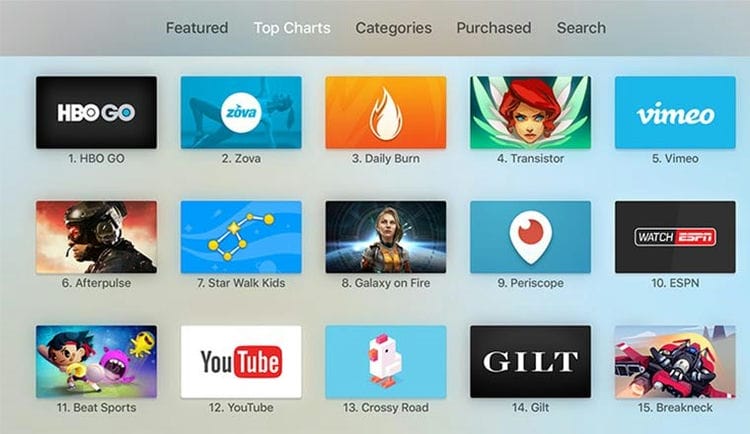
The App Store on Apple TV boasts its own catalog of games and apps.
Gamers will find something to play, fans of various videos, TV shows and bloggers' creativity will install RuTube, Youtube applications, series fans will find branded applications of ivi.ru and Amediateka video services.
All in all, Apple TV is a fun night out with your family or friends.
How to connect Apple TV
The set-top box manufacturers have tried to simplify as much as possible the procedure for connecting Apple TV to TVs, iPhone, iPad, Mac.
The procedure for connecting to a TV is as follows:
-
Connect the corresponding connectors on the set-top box and the TV with an HDMI cable.
-
Connect the supplied power cable to the corresponding socket on the set-top box and plug it into a power outlet.
-
When using wired internet, connect the provider's cable to the gigabit port on the TV box.
To connect the set-top box, connect the HDMI, Ethernet and power connectors in series with cables
-
Turn on the TV, select the “HDMI” broadcast source in the settings.
-
Pair the remote with a single touch on the touch panel.
-
After the settings screen appears, select your language and region.
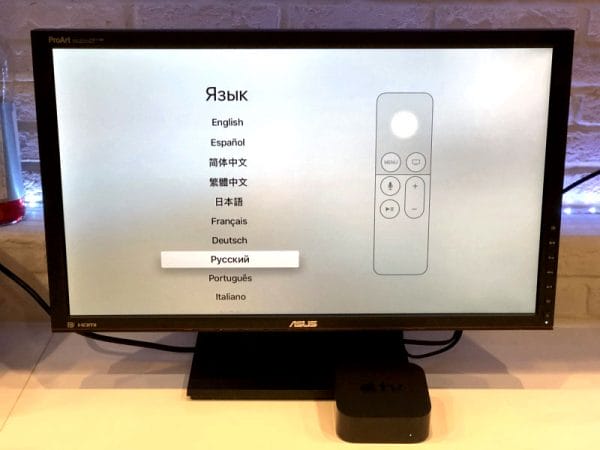
When you first connect the set-top box in the “Language” section, you need to select “Russian”
Connecting Apple TV to iPhone and iPad is even easier. AirPlay is used to sync both devices. To activate it on iPhone, you need to follow these steps:
-
Go to the “Control Center” section with a swipe from the bottom up.
-
Press the “Screen Repeat” button.
-
In the list of devices that opens, select Apple TV. Then the wireless connection with the set-top box will be established automatically.
![Apple TV User Guide. Apple tv: what it is, how it works]()
Connecting Apple TV to iPhone and iPad follows the same pattern.
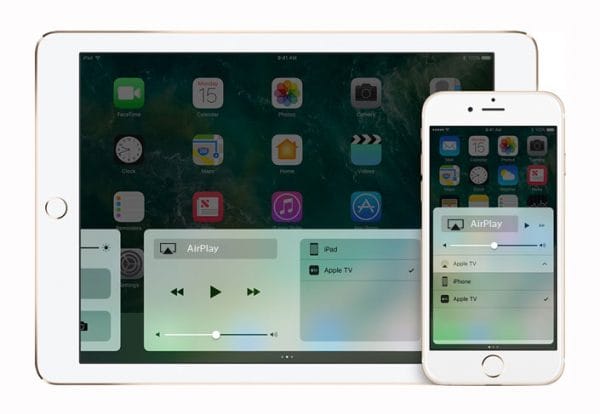
On Mac devices, the connection algorithm is the same, the only difference is the location of the AirPlay icon, which on most devices appears in the top menu bar. If it is not there, then you can activate the function through the “Control Center”, which can be accessed by double clicking on the “Home” button.
Features of using the prefix
Apple TV is easy to use. After connecting the device to the TV, the user has the opportunity to make further settings in two ways: “Manually” or “Using the device”. The second method is much more convenient, because it allows you to automatically transfer the data necessary for setting up from your iPhone or iPad. To do this, unlock the iOS device, bring it to the set-top box and follow the instructions on the display. In the absence of an “apple” device, the settings are made manually: information about the Wi-Fi network is entered, the Apple ID is entered. If the set-top box supports 4K video, then you will additionally have to perform a test to adjust the sound and image quality.

You can configure the set-top box access to Apple services using an iPhone by entering an existing Apple ID or creating a new one
A quick tour of Apple TV apps
For the Apple set-top box, over the 12 years of its existence, a wide variety of applications have been developed: educational, entertainment, sports, etc. In the official AppStore, any owner of an iOS device will find a program for himself to his taste. Some of the popular apps for Apple TV 4 / 4K are the following:
- Plex. A simple and free player that allows you to play video files of various formats both from your home collection and from the iTunes service without conversion;
- KinoPoisk. An application for moviegoers, where you can rent or purchase licensed films, view movie posters, purchase tickets for a cinema show, watch a movie online in FullHD;
- Amediateka. A huge online library in which films and TV series are available for viewing right on the day of the premiere both in Russian voice acting and in the original language with subtitles;
- Zova. An app for fitness enthusiasts looking to improve the quality of their workouts. Guides, tips, videos from the world's best health and fitness experts;
- Kitchen Stories. A great helper for those who love to cook. In addition to many video recipes, the application contains many life hacks and recommendations to help improve your culinary skills;
- Asphalt: Storming the Streets. Popular arcade racing game with beautiful detailed 3D graphics and a huge selection of cars and bikes;
- Calm. Online collection of meditation exercises, breathing programs, stretching exercises, relaxing music for healthy sleep and relaxation.
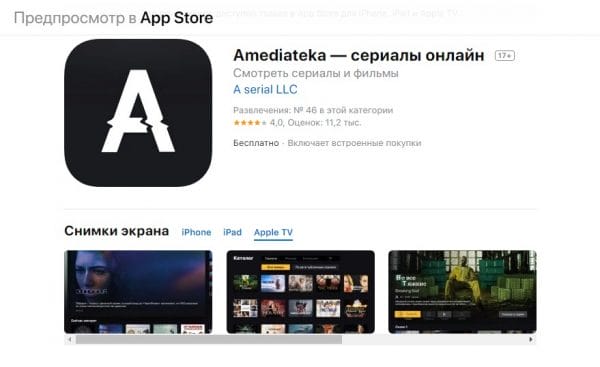
Amediateka is a popular app for accessing the best TV series, feature films, documentaries and music shows
Apple TV startup setup

After all connections are made, you can proceed to the direct setup of the Apple TV 4 software, guided by the following step-by-step guide:
- Turn on the monitor connected to the set-top box. After that, the screen should be automatically highlighted as in the picture above. If this does not happen, it is required to note in the display settings that the source of the image is the HDMI output connected to the Apple TV, and not AV or other input signals.
- Connect your Apple TV remote. This is done by simply clicking on the touch panel of the device.
- Select the desired language, region and country of residence in the remote control menu. If you make a mistake during the selection, you can go back and change the settings using the Menu button.
- You can do the rest of the process using your iPhone, or you can continue to do it directly on the set-top box using the remote. It is more convenient and easier to carry out operations through the phone. Nevertheless, let's consider both options. When setting up a mobile phone, make sure that WiFi and Bluetooth are activated on it. You need to connect to the media device and adhere to the manual shown on the display. If you choose manual adjustment, you will have to enter the WiFi network data (SSID) and epl-identifier yourself. It may be necessary to activate the equipment, which will take some time.
- Define options for sharing location services, screen savers, and statistics. The instruction that appears on the display will tell you how to finish the adjustment correctly.
In conclusion, it is worth downloading several applications from the Apple store – and you can begin to fully use the multimedia gadget.
The subtleties of controlling the set-top box via a smartphone
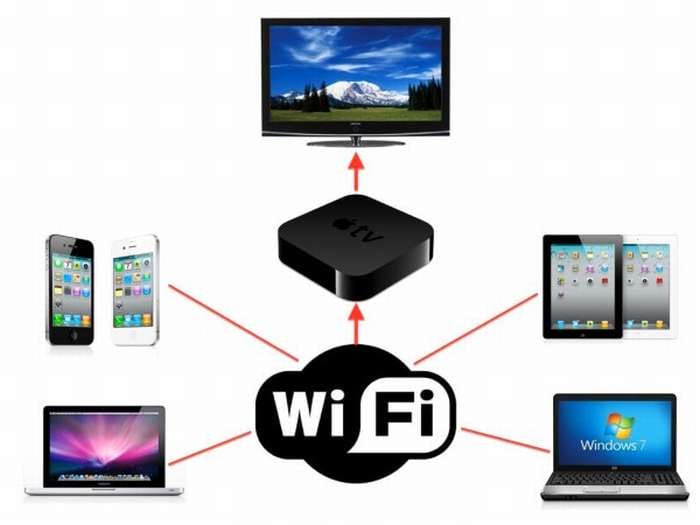
The ability to configure and control the media player exclusively through the phone appeared after the release of the seventh version of iOS. There's a new feature called iBeacon. It is this innovation that allows the iPhone and set-top box to work in synchronization mode. In addition, iBeacon provides the transfer of any kind of information using Bluetooth technology.
To work with a set-top box via a smartphone, you must:
- Unlock iPhone screen.
- Connect it to WiFi internet.
- Download Apple TV Remote Utility
- Wait until the set-top box is fully synchronized with the TV.
Bluetooth must be active!
The setup should start with a light touch of the top of the console with a smartphone, after which the latter needs to be moved about 20 cm away. The display will show a proposal to continue the process, which will require confirmation.
The next step is to enter your personal epl-identifier and password from it. Further, the automatic setup process will take place, which will take about a minute. After that, the media device will connect to the WiFi network, iTunes will be configured, and all equipment is ready for full use.
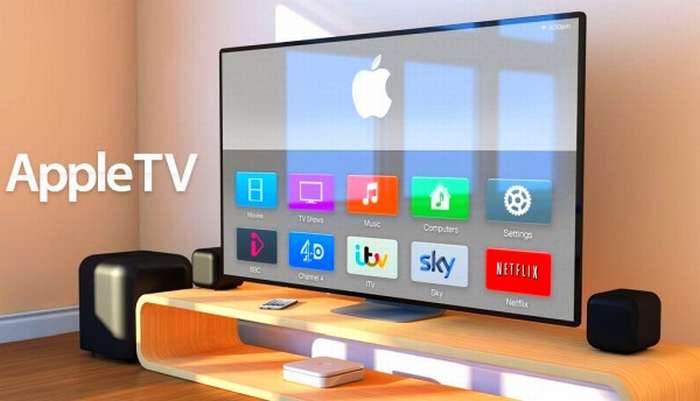
If it is not possible to connect to the selected Internet network or if there are several networks within the reach of the media device, during installation, a message may appear stating that there is a problem with the connection to the network, and the desired WiFi network cannot be found. There is nothing to worry about, and you should not be afraid of losing the configuration. You just need to press the menu button on the remote control, select the “Other” item and enter the name of the desired network (SSID). After the software recognizes the network to which the iPhone is connected, the automatic installation will begin and all adjustments will be completed.
Organization of remote control and final setting
Apple ID settings, wireless network name, and other user data can be set manually or automatically. The second method is as fast and understandable as possible for people who do not have special knowledge of setting up.
Remote control
Using the remote control, enter the settings menu. There is a whole list of points here:
- Accounts;
- audio and video parameters;
- AirPlay settings;
- network parameters and others.
If you have certain skills or knowledge, it will not be difficult to set the user parameters necessary for work.
iPhone и iPad
To transfer the user ID, name and password of the wireless network, and other settings as quickly as possible, you can use the “Configure device” menu item. Before activating it, you need to turn on Bluetooth and Wi-fi modules on your smartphone or tablet. After that, a connection is made to the attachment.
When setting up the device, the user is only required to follow the prompts on the screen. At the end of all the work, all the necessary settings will be transferred to the Apple TV. All that remains is to set permissions for geolocation, sending statistics and screensaver parameters. After that, the set-top box can be used immediately, for example, watch movies or download, install applications from the AppStore.
Initial setup of the STB
The first time you turn it on, you need to set up your Apple TV right away. It is convenient to do this using the supplied remote control. By swiping on the touch pad (“swipes”), you need to select the initial parameters, language, country, region. If the user made a mistake while typing, you can return to the previous step. This is done by pressing the Menu button on the remote control.
Choose a language and turn on Siri
Swipe on the Touch surface of the Apple TV Remote to select your language and country or region. Press the Touch surface to select the desired option. If you selected the wrong language, press the menu button to return to the previous screen and try again.
If prompted, choose whether to activate Siri.

Continue setup using an iOS device or manually
To automatically add your Apple ID and Wi-Fi settings to Apple TV, choose Set Up Device. Then, unlock your iOS device, hold it near your Apple TV, and follow the instructions on the screen of your iOS device and Apple TV.
If you don't want to use an iOS device to customize your Apple TV, select Set Up Manually. Then follow the onscreen instructions on your Apple TV to connect to your home Wi-Fi network and sign in with your Apple ID.
If you don't have an Apple ID, create one. If you've forgotten your Apple ID, learn what to do.
Signing in to your TV service provider
In some countries and regions, you can sign in to your Apple TV with your TV or cable provider to watch the TV shows and movies with your subscription.
Selecting settings
Turn on One Home Screen to sync the Home screen and apps across all Apple TVs. Select the room where your Apple TV is located and it will automatically be added to the Home app on your iOS device and Mac. Or add users on Apple TV.
Connecting to a TV
On the case of modern home video equipment, there must be an HDMI connector, which is an interface for receiving high-definition multimedia files. It transmits digital video information and copy-protected audio signals. The connection cable may not be included with the TV set, but it can be purchased at any store that specializes in the sale of video equipment. If you do not want to leave the house anywhere, you can use a component (video + audio) cable as a transmitting cable.
In order for the device to work in conjunction with the TV, you should:
- connect the apple TV to the electrical network and connect to the socket on the TV;
- a special window will be displayed on the TV screen, in which further settings are made;
- take a remote control, connect to the Internet using your username. And then the actions are similar to those in a smartphone. If the remote control does not respond, press the volume (up) and “Menu” buttons simultaneously for a few seconds.
All children love to play exciting computer games. Some adults do not miss this opportunity too. Apple TV can also function as a game console. The operating system on the basis of which the apple prefix works is iOS. This allows anyone familiar with iPhone to easily operate the transmitter. By setting up your smartphone via the Remote application, you can control the set-top box from a distance, while typing text is performed without problems.
Screen connection
The connection is made via a cable to the HDMI jacks of the screen and set-top box.
- Turn on the screen. If it is not automatically highlighted, then in the screen settings you should specify the interface input to which the set-top box is connected.
- Select Siri Remote on the remote display with one click.
- Indicate the language (Russian), the name of the country and region.
- Proceed with the installation using the iPhone. Enter the password and all the requested data.
- Wi-Fi is used to transfer data from a mobile phone or iPad.
- To connect Apple TV 4k, they independently enter the wireless network data, as well as the login with the device password.
- Wait a few minutes and select the required share values.
- Complete the setting by following the instructions on the display.
Internet connection
There are two ways to connect to the Internet: wired and wireless. In the first case, the device will automatically find the network, but you need to tinker with the wireless transmission of information. To do this, using the remote control and a smartphone, an IP address is entered, DNS, a subnet mask and a router are indicated. Then follow the suggested settings, after which you can watch movies on the Internet on the TV screen.

This set-top box is easy to connect to the Internet
Apple TV settings
How do I connect and set up Apple TV?
- The first step is to connect the power to the device and equipment on which you plan to view media files.
- In the window that appears on the screen, follow all the settings.
- Turn on the remote control by simply clicking on the remote control display.
- Presetting is in progress: language, country is selected, login and password for Wi-Fi /
- If the connection to the Internet is successful, credentials are set on the services.
- Now you can try watching videos from the worldwide network.
The operating manual of the device describes in detail all the operations for connecting and setting up the equipment.
Apple TV indicator
On the front panel of the set-top box, there is a light indicator that allows you to determine the status of the device.
The indicator lights up white – the device is turned on
LED does not light up – EPL TV off
The indicator blinks orange – loading in progress
The indicator blinks white – the set-top box is receiving a command from the remote control
Single orange flash – Apple TV rejects the command from the remote control, the remote control with which it has not been paired is used
The indicator blinks white alternately and
orange – a problem has been detected in the operation of the device.
Advice
- If streaming video is interrupted, try restarting your Apple TV either through the menu, or simply unplug the power for a few seconds and then plug it back in.
- Give up cable TV. You will skip part of the TV broadcast at first, but soon you will be able to watch the latest movie releases, TV shows without ads, and as many Star Trek reruns as you want.
- Use iTunes or iPhoto to set up folders for your slideshow.
- If there is no signal after turning on the TV, press any button on the Apple Remote. Apple TV goes into sleep mode and pressing any button wakes it up.
Warnings
- Microwave radiation can interfere with the network. Therefore, fry the popcorn before watching the movie.
Conclusion
Thus, setting up Apple TV is not an overly difficult task. Any user of modern gadgets can do it. The main thing in this case is to correctly connect all available cables to the TV (power, HDMI, LAN) and strictly follow the instructions. Use only original equipment with licensed P.O.
Sources used and useful links on the topic: https://ProSmartTV.ru/iptv/kak-rabotaet-apple-tv.html https://support.apple.com/ru-ru/guide/tv/welcome/tvos https: //tv-vybor.ru/stati/330-apple-tv-chto-jeto-takoe-kak-jeto-rabotaet.html https://www.iphones.ru/iNotes/586572 https://itmaster.guru/ nastrojka-interneta / smart-tv / apple-tv-chto-eto.html https://a-apple.ru/televizoryi/osobennosti-podklyucheniya-i-nastroyki-apple-tv https://Otvet.tv/tehnika/ tv-pristavka / apple-tv-podklyuchenie-i-nastrojka.html https://support.apple.com/ru-ru/HT205358 https://televizor.guru/mediapleery/kak-podkljuchit.html https: // zen .yandex.ru / media / krupnik_service / apple-tv-podkliuchenie-nastroika-ustranenie-nepoladok-5ae2b6a98309054af4cc4747 https://ru.wikihow.com/%D0%BF%D0%BE%D0%BB%D1%8C%D0%B7%D0%BE%D0%B2%D0%B0%D1%82%D1%8C % D1% 81% D1% 8F-Apple-TV
Post source: lastici.ru